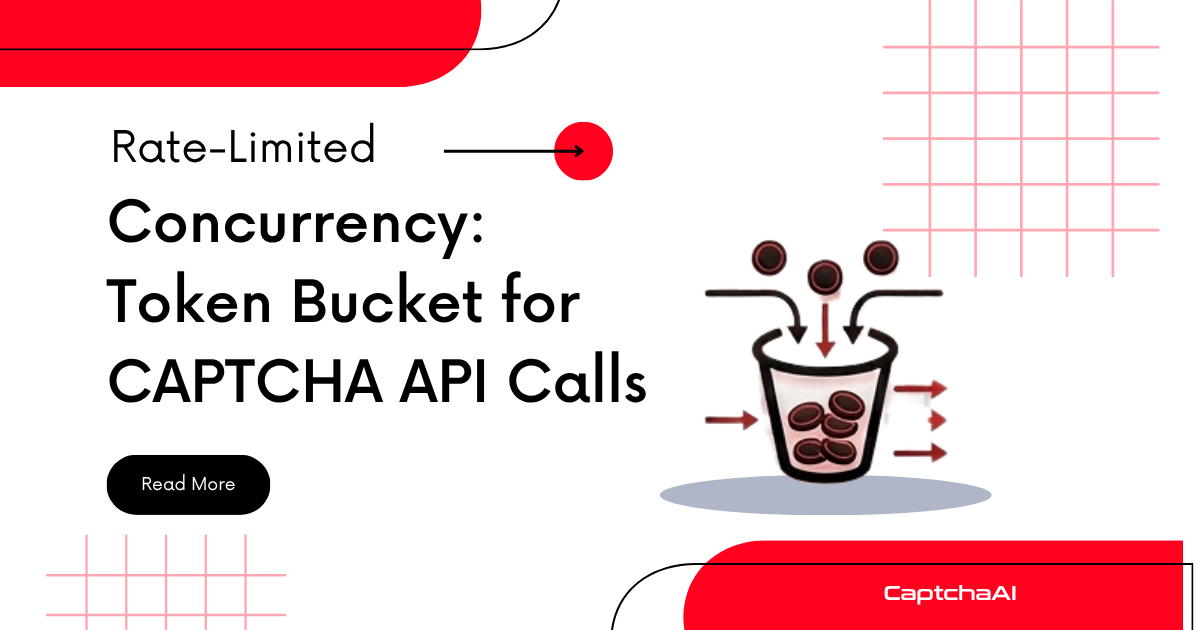
Uncontrolled concurrency sends requests as fast as possible. That leads to ERROR_TOO_MUCH_REQUESTS, wasted API balance, and unpredictable costs. A token bucket lets you set an exact rate — "no more than 20 submissions per second" — while still allowing short bursts when capacity is available.
How a Token Bucket Works
[Bucket] capacity=20, refill=10/sec

Time 0:  ████████████████████  20 tokens available
         → 15 requests consume 15 tokens
Time 0:  █████                 5 tokens remain

Time 1s: ███████████████       15 tokens (5 + 10 refilled)
         → 15 requests consume 15 tokens
Time 1s: (empty)               0 tokens

Time 2s: ██████████            10 tokens (0 + 10 refilled)
         → Request waits if bucket is empty
Key properties:
- Capacity — maximum burst size
- Refill rate — sustained requests per second
- Requests wait when the bucket is empty (no rejection, just throttling)
Python Implementation
Thread-Safe Token Bucket
import time
import threading


class TokenBucket:
    def __init__(self, capacity, refill_rate):
        """
        Args:
            capacity: Maximum tokens (burst size)
            refill_rate: Tokens added per second
        """
        self.capacity = capacity
        self.refill_rate = refill_rate
        self.tokens = capacity
        self.last_refill = time.monotonic()
        self.lock = threading.Lock()

    def acquire(self, timeout=None):
        """Block until a token is available."""
        deadline = time.monotonic() + timeout if timeout else float("inf")

        while True:
            with self.lock:
                self._refill()
                if self.tokens >= 1:
                    self.tokens -= 1
                    return True

            # Check timeout
            if time.monotonic() >= deadline:
                return False

            # Wait before retrying (avoid busy loop)
            time.sleep(min(1.0 / self.refill_rate, 0.1))

    def _refill(self):
        now = time.monotonic()
        elapsed = now - self.last_refill
        new_tokens = elapsed * self.refill_rate
        self.tokens = min(self.capacity, self.tokens + new_tokens)
        self.last_refill = now
Rate-Limited CAPTCHA Solver
import os
import requests
from concurrent.futures import ThreadPoolExecutor, as_completed

API_KEY = os.environ["CAPTCHAAI_API_KEY"]

# Allow 10 submissions/sec with burst of 20
rate_limiter = TokenBucket(capacity=20, refill_rate=10)


def solve_captcha_rate_limited(sitekey, pageurl):
    """Solve with rate limiting on submission."""
    # Wait for token before submitting
    rate_limiter.acquire()

    resp = requests.post("https://ocr.captchaai.com/in.php", data={
        "key": API_KEY,
        "method": "userrecaptcha",
        "googlekey": sitekey,
        "pageurl": pageurl,
        "json": 1
    })
    data = resp.json()

    if data.get("status") != 1:
        raise RuntimeError(data.get("request"))

    captcha_id = data["request"]

    # Polling doesn't need rate limiting (separate concern)
    for _ in range(60):
        time.sleep(5)
        result = requests.get("https://ocr.captchaai.com/res.php", params={
            "key": API_KEY, "action": "get", "id": captcha_id, "json": 1
        }).json()

        if result.get("status") == 1:
            return result["request"]
        if result.get("request") != "CAPCHA_NOT_READY":
            raise RuntimeError(result.get("request"))

    raise TimeoutError("Solve timeout")


# Run 100 tasks through rate limiter
tasks = [
    {"sitekey": "6Le-wvkSAAAAAPBMRTvw0Q4Muexq9bi0DJwx_mJ-",
     "pageurl": f"https://example.com/p/{i}"}
    for i in range(100)
]

with ThreadPoolExecutor(max_workers=30) as executor:
    futures = {
        executor.submit(
            solve_captcha_rate_limited, t["sitekey"], t["pageurl"]
        ): t for t in tasks
    }

    for future in as_completed(futures):
        task = futures[future]
        try:
            solution = future.result()
            print(f"[OK] {task['pageurl']}")
        except Exception as e:
            print(f"[ERR] {task['pageurl']}: {e}")
JavaScript Implementation
Async Token Bucket
class TokenBucket {
  constructor(capacity, refillRate) {
    this.capacity = capacity;
    this.refillRate = refillRate; // tokens per second
    this.tokens = capacity;
    this.lastRefill = Date.now();
    this.waitQueue = [];
  }

  _refill() {
    const now = Date.now();
    const elapsed = (now - this.lastRefill) / 1000;
    this.tokens = Math.min(this.capacity, this.tokens + elapsed * this.refillRate);
    this.lastRefill = now;
  }

  async acquire() {
    this._refill();

    if (this.tokens >= 1) {
      this.tokens -= 1;
      return;
    }

    // Wait until a token is available
    const waitTime = ((1 - this.tokens) / this.refillRate) * 1000;
    await new Promise((resolve) => setTimeout(resolve, waitTime));

    this._refill();
    this.tokens -= 1;
  }
}
Rate-Limited Batch Solver
const axios = require("axios");

const API_KEY = process.env.CAPTCHAAI_API_KEY;
const rateLimiter = new TokenBucket(20, 10); // 20 burst, 10/sec sustained

function sleep(ms) {
  return new Promise((resolve) => setTimeout(resolve, ms));
}

async function solveCaptchaLimited(sitekey, pageurl) {
  // Wait for rate limit token
  await rateLimiter.acquire();

  const submitResp = await axios.post(
    "https://ocr.captchaai.com/in.php",
    null,
    {
      params: {
        key: API_KEY,
        method: "userrecaptcha",
        googlekey: sitekey,
        pageurl: pageurl,
        json: 1,
      },
    }
  );

  if (submitResp.data.status !== 1) {
    throw new Error(submitResp.data.request);
  }

  const captchaId = submitResp.data.request;

  for (let i = 0; i < 60; i++) {
    await sleep(5000);
    const result = await axios.get("https://ocr.captchaai.com/res.php", {
      params: { key: API_KEY, action: "get", id: captchaId, json: 1 },
    });

    if (result.data.status === 1) return result.data.request;
    if (result.data.request !== "CAPCHA_NOT_READY") {
      throw new Error(result.data.request);
    }
  }

  throw new Error("TIMEOUT");
}

// Solve 100 tasks — rate limiter ensures max 10 submissions/sec
async function batchSolve(tasks) {
  const results = await Promise.allSettled(
    tasks.map((t) => solveCaptchaLimited(t.sitekey, t.pageurl))
  );

  const solved = results.filter((r) => r.status === "fulfilled").length;
  const failed = results.filter((r) => r.status === "rejected").length;
  console.log(`Solved: ${solved}, Failed: ${failed}`);
}
Choosing Parameters
| Workload | Capacity (burst) | Refill rate (sustained) |
|---|---|---|
| Light scraping | 5 | 2/sec |
| Standard automation | 20 | 10/sec |
| High-volume pipeline | 50 | 30/sec |
| Maximum throughput | 100 | 50/sec |
Rules of thumb:
- Set capacity to 2× refill rate (allows 2-second bursts)
- Start conservative, increase while monitoring error rates
- Rate-limit submissions only — polling is lightweight and self-limiting
Token Bucket vs Other Algorithms
| Algorithm | Behavior | Best for |
|---|---|---|
| Token bucket | Smooth rate with burst allowance | CAPTCHA API calls |
| Leaky bucket | Fixed output rate, no bursts | Strict rate requirements |
| Fixed window | Count per time window, edge bursts | Simple counters |
| Sliding window | Count over rolling period | Accurate rate enforcement |
Token bucket is the best default — it allows natural bursts (scraper finds 20 CAPTCHAs at once) while enforcing a sustained rate.
Troubleshooting
| Issue | Cause | Fix |
|---|---|---|
| Requests still getting throttled | Rate limiter set higher than API allows | Lower refill rate to match CaptchaAI's limits |
| High latency on requests | Tokens depleted, waiting for refill | Increase capacity for burst scenarios |
| Memory growing | Wait queue accumulating | Set a maximum queue size; reject excess requests |
| Rate limiter not shared across processes | In-memory only | Use Redis-based token bucket for distributed rate limiting |
FAQ
Should I rate-limit submissions, polling, or both?
Rate-limit submissions only. Polling requests are lightweight and self-throttle via time.sleep(5). Over-limiting polling increases solve latency without benefit.
How do I handle ERROR_TOO_MUCH_REQUESTS despite rate limiting?
Your rate limit is set too high. Lower the refill rate. Also check if multiple processes share the same API key — aggregate rate across all processes.
Can I use a rate limiter per CAPTCHA type?
Yes — create separate token buckets for different CAPTCHA types. This prevents high-volume reCAPTCHA v2 tasks from starving Turnstile submissions.
Related Articles
Next Steps
Build rate-controlled CAPTCHA solving — get your CaptchaAI API key and implement sustainable request rates.
Related guides:
Full Working Code
Complete runnable examples for this article in Python, Node.js, PHP, Go, Java, C#, Ruby, Rust, Kotlin & Bash.
View on GitHub →





Discussions (0)
Join the conversation
Sign in to share your opinion.
Sign InNo comments yet.