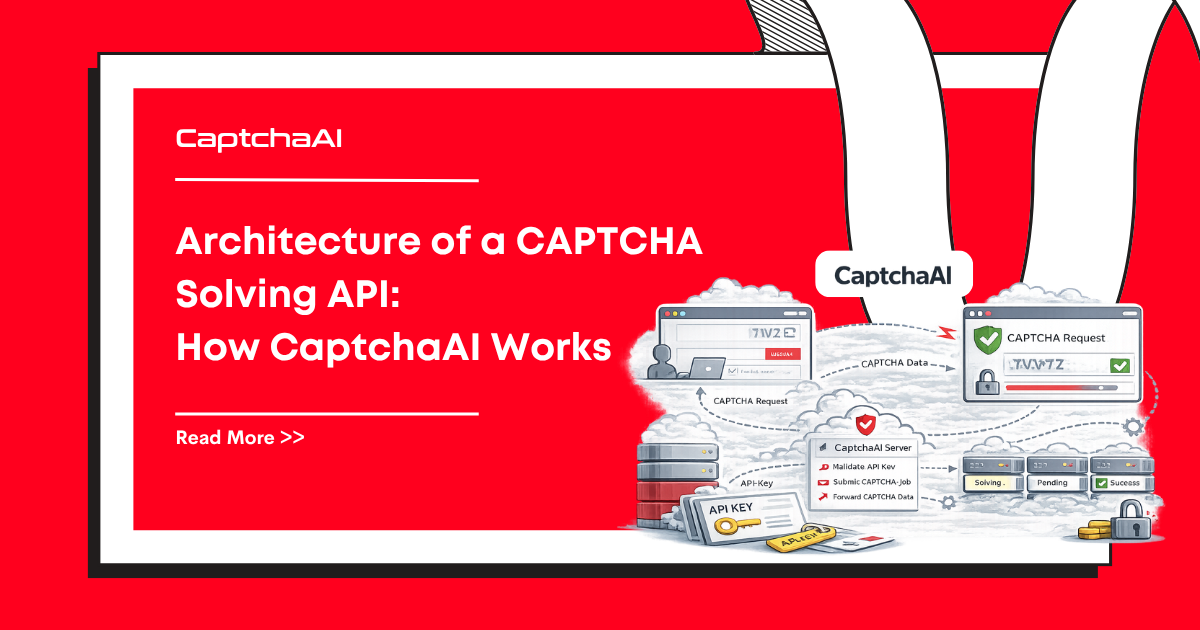
A CAPTCHA solving API takes an impossible-to-automate challenge and returns the solution through simple HTTP calls. But between your POST to /in.php and the result from /res.php, there is an entire distributed system handling routing, solving, and delivery. Understanding this architecture helps you build more efficient integrations.
The request lifecycle
Every CAPTCHA solve follows this path:
Your code → Submit (in.php) → Queue → Router → Solver → Result store → Poll (res.php) → Your code
Each stage has specific responsibilities.
Stage 1: Task submission
You send a POST request to https://ocr.captchaai.com/in.php with your API key and CAPTCHA parameters.
What happens:
- Authentication — API key validated, balance checked
- Parameter validation — Required fields verified for the method type
- Rate check — Request rate and concurrent task limits checked
- Task creation — A unique task ID is generated
- Response — Task ID returned immediately
{"status": 1, "request": "12345678"}
This returns in milliseconds — no solving happens yet. Your task is now in the queue.
Stage 2: Task routing
The router examines the task and directs it to the appropriate solver pool.
| Decision factor | Routes to |
|---|---|
| Method type | reCAPTCHA pool, Turnstile pool, OCR pool, etc. |
| Complexity | Standard workers or specialized workers |
| Proxy requirements | Workers with proxy support |
| Current load | Least-loaded worker group |
Different CAPTCHA types require fundamentally different solving infrastructure:
- Token CAPTCHAs (reCAPTCHA, Turnstile) → Browser-based workers that simulate human interaction
- Image/OCR CAPTCHAs → ML models for character recognition
- Grid image CAPTCHAs → Computer vision models for object detection
- Challenge CAPTCHAs (Cloudflare) → Full browser environments with proxy support
Stage 3: Solving
The solving stage is where the actual CAPTCHA is processed. This is the time-consuming part.
For token CAPTCHAs (reCAPTCHA, Turnstile):
- A browser environment loads the target page (or simulates the context)
- The CAPTCHA widget is rendered
- Browser automation solves the challenge (selects images, passes behavioral checks)
- The resulting token is captured
For image/OCR CAPTCHAs:
- The image is preprocessed (noise removal, normalization)
- ML models analyze the image
- Characters/objects are identified
- The text answer or grid selections are generated
For Cloudflare Challenge:
- A browser with the specified proxy and User-Agent loads the page
- Cloudflare's JavaScript challenges are executed
- Browser checks pass (canvas, WebGL, etc.)
- The
cf_clearancecookie is captured
Stage 4: Result storage and delivery
Once solved, the result is stored and made available for polling.
Polling (default):
Your code calls GET /res.php to check if the task is complete:
CAPCHA_NOT_READY → Wait → Poll again
When ready:
{"status": 1, "request": "SOLVED_TOKEN_abc123"}
Callback/webhook (alternative):
Instead of polling, you can provide a pingback URL when submitting. CaptchaAI sends the result directly to your endpoint when the solve is complete — no polling needed.
System architecture diagram
┌─────────────┐
│  Your Code  │
└──────┬──────┘
       │ POST /in.php
       ▼
┌─────────────┐     ┌──────────────┐
│   API Gate  │────▶│  Task Queue  │
│ (auth, rate │     └──────┬───────┘
│  limiting)  │            │
└─────────────┘            ▼
                    ┌──────────────┐
                    │   Router     │
                    └──┬───┬───┬──┘
                       │   │   │
              ┌────────┘   │   └────────┐
              ▼            ▼            ▼
        ┌──────────┐ ┌──────────┐ ┌──────────┐
        │ reCAPTCHA│ │ Turnstile│ │ OCR/Image│
        │ Workers  │ │ Workers  │ │ Workers  │
        └────┬─────┘ └────┬─────┘ └────┬─────┘
             │             │             │
             └──────┬──────┘─────────────┘
                    ▼
             ┌─────────────┐
             │ Result Store│
             └──────┬──────┘
                    │ GET /res.php
                    ▼
             ┌─────────────┐
             │  Your Code  │
             └─────────────┘
Performance characteristics
| Metric | Typical value |
|---|---|
| Submit latency | < 100ms |
| Poll latency | < 100ms |
| reCAPTCHA v2 solve | 10–30 seconds |
| reCAPTCHA v3 solve | 8–20 seconds |
| Turnstile solve | 5–15 seconds |
| Cloudflare Challenge | 15–30 seconds |
| Image/OCR solve | 2–5 seconds |
| Grid image solve | 5–10 seconds |
How this affects your integration
Understanding the architecture explains common integration patterns:
| Pattern | Architecture reason |
|---|---|
| Poll every 5 seconds | Results are stored; polling faster wastes API calls |
| Initial wait before first poll | Solving takes time; first poll before 5–10s always returns NOT_READY |
| Use callbacks for high volume | Eliminates polling overhead; results pushed to you |
| Handle ERROR_NO_SLOT_AVAILABLE | Queue has capacity limits; back off and retry |
| Separate submit and poll concerns | Submit is async; result delivery is independent |
FAQ
Why is there a delay between submit and result?
CAPTCHA solving requires browser simulation, image analysis, or behavioral verification — real computations that take time. The async submit/poll pattern lets your code continue working while the solve happens.
Can I get results faster?
Some things help: use the correct CAPTCHA type (wrong types waste time), provide accurate parameters (wrong sitekey causes retries), and use pingback to avoid polling latency.
What happens if a solver fails?
Failed tasks are automatically retried internally. If the task cannot be solved after retries, an error is returned (e.g., ERROR_CAPTCHA_UNSOLVABLE).
How does CaptchaAI scale?
Worker pools scale independently by CAPTCHA type. More reCAPTCHA demand adds reCAPTCHA workers. Image/OCR demand adds OCR capacity. This allows efficient resource allocation.
Start solving CAPTCHAs with CaptchaAI
Build on a production-grade CAPTCHA solving infrastructure at captchaai.com.

Discussions (0)
Join the conversation
Sign in to share your opinion.
Sign InNo comments yet.